
Close Menu
Roleplay With AI
    X (Twitter) Reddit Discord
    Roleplay With AIRoleplay With AI
    • Home
    • What’s New
      • Newsletter
    • News
      • Interviews
    • Guides
      • LLMs For AI Roleplay
      • Beginner Guides
    • Entertainment
      • Opinions
    • AI Roleplay
      • Feature Articles
      • Local Roleplay
      • Online Roleplay
    Roleplay With AI
    Home»Online Roleplay»LoreBary»Use LoreBary On Chub
    Use LoreBary On Chub
    LoreBary

    Use LoreBary On Chub

    By WayfarerFebruary 1, 20263 Mins Read

    At its core, Sophia’s LoreBary is a proxy service, primarily used by JanitorAI users, that provides a unified library of commands, plugins, lorebooks, and more to enhance their roleplay experience. The service also offers features to manage context cache and make long roleplays enjoyable!

    Following the LoreBary 2.0 update, the service, its content, and features can now be used on almost any frontend. Chub offers several of LoreBary’s features natively on its platform. However, if you enjoy using LoreBary’s unified content library along with its features across other platforms, you may also want to use LoreBary on Chub.

    Table of Contents
    1. Set Up LoreBary As An OpenAI Reverse Proxy On Chub
      1. Configure Prompt Structure And Generation Parameters
    2. Chub’s OpenAI Reverse Proxy Limitations
    3. Use LoreBary On Chub

    Set Up LoreBary As An OpenAI Reverse Proxy On Chub

    Note: For this guide, our LLM provider is DeepSeek’s first-party API.

    To use LoreBary on Chub, you have to first set it up as an OpenAI Reversy Proxy. Start a new chat or open an existing one with any character on Chub, then click on the hamburger menu in the top right corner and go to the Secrets options. Here, you’ll set up a reverse proxy for OpenAI.
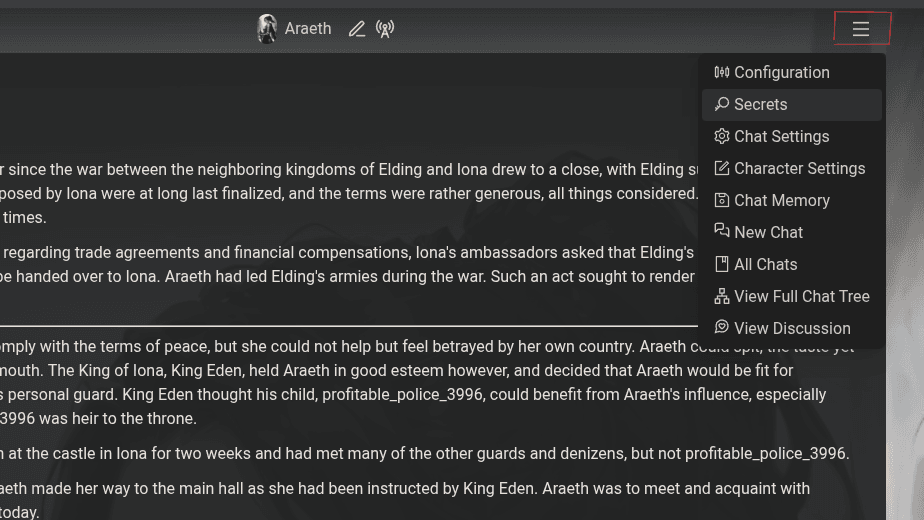
    Chub Set Up LoreBary As OpenAI Reverse Proxy
    • OpenAI Reverse Proxy: https://api.lorebary.com/deepseek (use the appropriate LoreBary proxy link for the provider of your choice/or enter your custom proxy link and do not add /v1 or any other path at the end of the link).
    • Reverse Proxy Key: Add the API key you created on your LLM provider’s site (in our case, we use the API key we created on DeepSeek’s first-party API platform).
    Chub Configure LoreBary As OpenAI Reverse Proxy

    Configure Prompt Structure And Generation Parameters

    Next, reopen the hamburger menu in the top right and go to the Configuration options. Under the Prompt Structure settings, set your API to OpenAI/Proxy and choose the model you want to use.

    Chub Prompt Structure Settings

    You can either select a Preset from Chub’s library or configure your own Prompt Structure and Generation Parameters. You need to add LoreBary’s commands, plugins, lorebooks, and other content codes, along with your base prompt, in the Pre History Instructions field.

    Lorebary Setup On Chub Pre History Instructions

    Configure the rest of the Prompt Structure and Generation Parameters as you desire, or use defaults set by the Preset you’ve selected.

    Save your settings, and you should now be ready to use LoreBary on Chub.

    Chub’s OpenAI Reverse Proxy Limitations

    Chub may not show all the models available through a provider properly in its drop-down menu. Providers like OpenRouter and Chutes may be unusable if you cannot select the model you want to use. This is a limitation on Chub’s end, and if you face this issue, you won’t be able to use LoreBary on Chub.

    Use LoreBary On Chub

    Following the LoreBary 2.0 update, you can use its library of content and its features on any online frontend that allows you to “bring your own model,” like JanitorAI, Chub, or WyvernChat.

    To use LoreBary on Chub, you have to first set it up as an OpenAI Reverse Proxy, and then configure or modify your Preset’s Prompt Structure to use OpenAI/Proxy as your API source and select the model you want to use. Add your LoreBary content codes to the Pre History Instructions field, save your settings, and your requests will be routed through LoreBary.


    API & Proxies
    Share. Twitter Reddit WhatsApp Bluesky Copy Link
    Wayfarer
    • Website
    • X (Twitter)

    Wayfarer is the founder of RPWithAI. He’s a former journalist who became interested in AI in 2023 and quickly developed a passion for AI roleplay. He enjoys medieval and fantasy settings, and his roleplays often involve politics, power struggles, and magic.

    Related Articles

    Use LoreBary On WyvernChat

    Use LoreBary On WyvernChat

    February 1, 2026
    Use Local Models Through Sophia's LoreBary

    Use Local Models Through Sophia’s LoreBary

    January 7, 2026
    Sophia's LoreBary 2.0 - Roleplay Studio, AI Assistant, And More

    Sophia’s LoreBary 2.0 – Roleplay Studio, AI Assistant, And More

    December 15, 2025
    Sophia’s Lorebary Climbs Into The Top 10 Apps List On OpenRouter

    Sophia’s Lorebary Climbs Into The Top 10 Apps List On OpenRouter

    August 22, 2025
    Use DeepSeek On Chub

    Use DeepSeek On Chub

    August 10, 2025
    Sophia’s Lorebary - More Than Just A JanitorAI Extension

    Sophia’s LoreBary – More Than Just A JanitorAI Extension

    August 8, 2025

    New Articles

    Use LoreBary On WyvernChat

    Use LoreBary On WyvernChat

    February 1, 2026
    Use LoreBary On Chub

    Use LoreBary On Chub

    February 1, 2026
    An Interview With Nev: WyvernChat, Its History, Challenges, And More

    An Interview With Nev: WyvernChat, Its History, Challenges, And More

    January 26, 2026
    WyvernChat: A Continuously Improving And Growing Platform

    WyvernChat: A Continuously Improving And Growing Platform

    January 26, 2026
    Use Local Models Through Sophia's LoreBary

    Use Local Models Through Sophia’s LoreBary

    January 7, 2026
    Subscribe to Our Newsletter!

    Stay in the loop with the AI roleplay scene! Subscribe to our newsletter to get our latest posts delivered directly to your inbox twice a month.

    About Us & Policies
    • About Us
    • Contact Us
    • Content Policy
    • Privacy Policy
    Connect With Us
    X (Twitter) Reddit Discord
    © 2026 RPWithAI. All rights reserved.

    Type above and press Enter to search. Press Esc to cancel.