


Sophia’s LoreBary is a proxy service, primarily used by JanitorAI users, that provides a unified library of commands, plugins, lorebooks, and more to enhance their roleplay experience. Following the LoreBary 2.0 update, users can create personal proxies to use the service with local models or any cloud provider of their choice.
You can use local models on any online frontend that allows you to “bring your own model,” like JanitorAI, Chub, or WyvernChat, through LoreBary.
Benefits Of Using Local Models
Even small 8B to 12B models can outperform some large models if you have the hardware to run them locally. These models may need more hand-holding and effort from your end to generate quality output, but it is worth it due to the benefits of using local models.
Free And Without Any Rate Limits
Apart from the cost of your hardware, which you already own, and electricity to keep it running, you don’t pay a single dime more for AI roleplay when using local models. There are no subscriptions or daily rate limits. When you use local models through Sophia’s LoreBary, you can chat with your characters to your heart’s content without burning a hole in your wallet.
No Censorship
OSS models and their fine-tunes that you can run locally generally have little to no censorship. There is no third-party service or corporate entity filtering content. You can easily work your way around refusals with prompts/instructions. You can enjoy your dark, gritty roleplays without LLMs lecturing you about ethics and safety.
Fine-Tuned Models And Choices
When you use a model from a cloud provider, you can only modify its behaviour and outputs through prompting. Flagship models are jack-of-all-trades. They perform well in AI roleplay, but they aren’t purpose-built for that. At their core, they are still “helpful assistants.”
When you run models locally, you can choose any OSS model, including fine-tuned models made specifically for AI roleplay. For example, if you are roleplaying with stubborn, unyielding characters, TheDrummer’s Snowpiercer 15B v3 may be a better choice than a larger model that breaks character to resolve conflicts.
Or, if you are into anthropomorphic or furry AI roleplay, you can use Mawdistical’s fine-tunes instead of struggling to teach larger models basic concepts through prompts or lorebooks. You have the freedom to pick a model that suits the style of roleplay you like, making it easier to generate the kind of responses you prefer and enjoy.
No Abrupt Changes Or Updates
You are in control of the models you run locally. No online provider dictates what models you can use by abruptly removing or updating the models you like. One of the reasons why OSS models are heavily used for AI roleplay is due to their reliable availability.
Use KoboldCpp As Your Backend
To use local models through Sophia’s LoreBary on a frontend of your choice, you first need to run them on your device using a local backend like KoboldCpp. KoboldCpp is an easy-to-use, free, open-source backend with several features geared towards creative use cases.
You can read the following articles to learn more about KoboldCpp and get it up and running on your device.
- KoboldCpp: Enabling Local AI Roleplay And Adventures
- Optimizing KoboldCpp For Roleplaying With AI
- Understanding LLM Quantization For AI Roleplay
Run KoboldCpp On The Cloud
If you don’t have a dedicated GPU or have one with 6GB or less VRAM, running even small models locally at an acceptable quant can be challenging. But that doesn’t mean you should give up on running LLMs “locally.”
You can run KoboldCpp on Google Colab (free with rate limits) or run KoboldCpp on Runpod (low cost and reliable). While it’s not truly “local,” running KoboldCpp on cloud services still comes with almost all the benefits of running it locally on your device.
How To Use Local Models Through Sophia’s LoreBary
Create an account on Sophia’s LoreBary, as you will need one to create a custom proxy and use local models through the service.
Enable KoboldCpp Remote Tunnel
Before launching KoboldCpp with your selected GGUF file, navigate to the “Network” settings and enable “Remote Tunnel.”
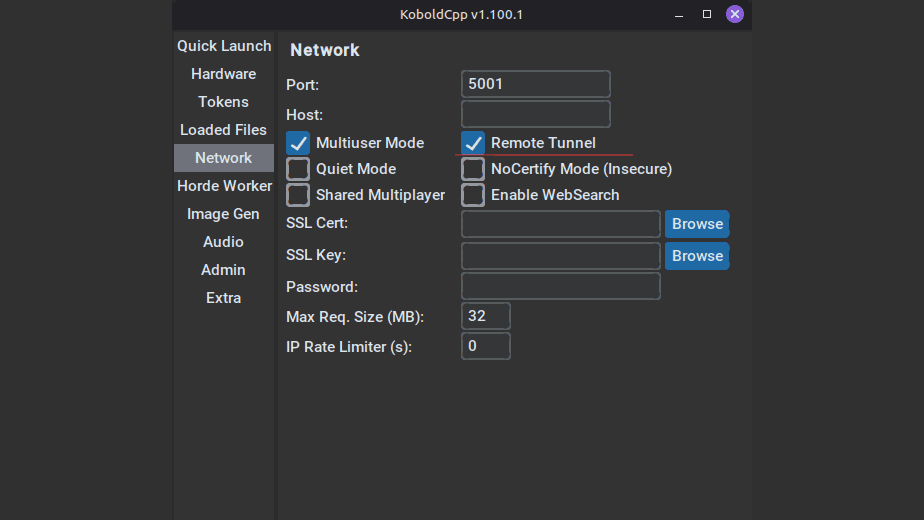
This will provide you with a trycloudflare link once KoboldCpp is running. You can copy the link through the terminal, or through your browser if KoboldAI Lite (KoboldCpp’s frontend) was launched.

Make sure you copy the OpenAI compatible API link. The link for this example is: https://hammer-andy-linked-palestinian.trycloudflare.com/v1
Create Custom Proxy On LoreBary
Click on your username/profile picture in LoreBary’s main navigation menu and go to your “Dashboard.” Once in your Dashboard, you’ll find “My Proxy” in the sidebar menu under “Main.”

- Click on “+ Add/Create Proxy” and enter the trycloudflare link as your Endpoint URL.
- Append the “/chat/completions” path from the menu.
Your final Endpoint URL should look as such: https://hammer-andy-linked-palestinian.trycloudflare.com/v1/chat/completions
Click on “Create & Test,” and you should receive a successful response. If setting up your custom proxy on Sophia’s LoreBary fails, make sure you’ve followed all the previous steps correctly and double-check your Endpoint URL.
Note: Your trycloudflare link will expire once you close KoboldCpp. The next time you launch the backend, it’ll provide you with a new link. You’ll need to update the Endpoint URL by editing your custom proxy on LoreBary every time you launch KoboldCpp.
Integrate With Your Frontend
Once you’ve successfully set up your custom proxy, you can use local models on any online frontend that allows you to use external models. Simply copy the custom proxy link provided by LoreBary and use it to configure your connection on the frontend.

JanitorAI requires a model name and an API Key, even though it states they’re “optional.” You’ll have to enter random strings in those fields, paste your URL, save your settings, and refresh the page. Follow similar steps on other frontends to start using local models through Sophia’s LoreBary.
Use Local Models Through Sophia’s LoreBary
Following the LoreBary 2.0 update, you can use local models on any online frontend that allows you to “bring your own model,” like JanitorAI, Chub, or WyvernChat, through LoreBary.
Running models locally provides you with greater control over model choice, has no censorship imposed by a third party, and is completely free with no rate limits. You’ll need to use a local backend, like KoboldCpp. If your hardware is not capable of running models locally, you can run KoboldCpp on cloud services like Google Colab (free) or Runpod (low cost).
Enable the Remote Tunnel option before launching KoboldCpp, create a custom proxy on Sophia’s LoreBary using your remote link, and use the custom link provided by LoreBary to configure your connection on any online frontend that allows you to use external models.