You’ve finally had enough of online AI roleplay platforms restricting your experience and decide to try SillyTavern. The idea of a reliable, feature-rich front end is exciting, but setting it up seems complicated.
SillyTavern might be more challenging to set up for use compared to the online platforms you’ve tried. However, the level of control it offers over your AI roleplay experience makes the time and effort worthwhile!
Install SillyTavern
SillyTavern’s documentation offers detailed instructions for installing the frontend on your operating system. Follow the steps to set up SillyTavern and all necessary dependencies.
Note: Installing the SillyTavern Launcher is easier and provides extra tools, such as easy updates to SillyTavern and automatic SSL certificate generation for your SillyTavern setup. We recommend installing the SillyTavern Launcher over the manual GIT install method.
- Windows installation documentation
- macOS and Linux installation documentation
- Android installation documentation
If you require assistance during the installation stage, you can ask for help on SillyTavern’s subreddit or Discord server.
Connect With Your Backend
SillyTavern connects to your preferred backend to communicate with an LLM model that powers your AI roleplay. You can either host LLMs locally or access them through online providers and services.
You won’t be able to run large, powerful LLM models on your consumer-grade hardware. However, you can run smaller models that are fine-tuned for roleplay. Running LLM models locally gives you a private, unfiltered, and free AI roleplay experience.
Alternatively, you can use large, powerful LLM models like DeepSeek or Google’s Gemini through the official API provider or a proxy service such as OpenRouter. Accessing LLM models via online providers and services does not guarantee complete privacy, and both options usually have daily free request limits or require payment.
KoboldCpp (Local)
KoboldCpp is an open-source, free backend that lets you run Large Language Models (LLMs) locally on your device. It’s a fork of llama.cpp and adds many additional features. Using it with SillyTavern provides an entirely local and private AI roleplay experience.
If you want to run LLMs locally, we recommend KoboldCpp. You can read the articles below to learn more about KoboldCpp, choose an LLM model, and optimize KoboldCpp for AI roleplay.
Connect SillyTavern To KoboldCpp’s API
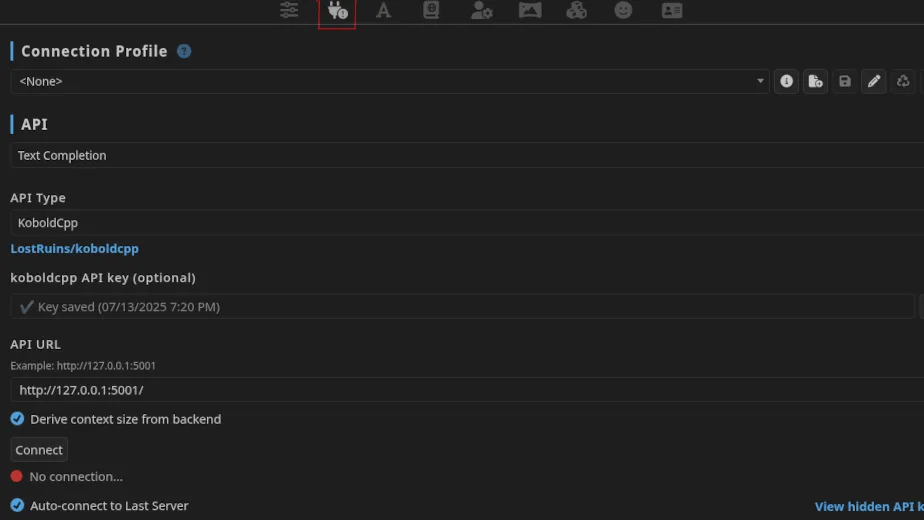
- Open the API Connections settings on SillyTavern.
- Set your API to Text Completion.
- Set your API Type to KoboldCpp.
- If you’ve set a password in KoboldCpp’s network settings, enter the same password in the koboldcpp API key (optional) field.
- The default API URL for KoboldCpp is
http://127.0.0.1:5001/. - Check the Derive context size from backend option to use the context size set in KoboldCpp’s settings.
DeepSeek (API)
DeepSeek’s affordable prices, discounted happy hours, and quality creative writing have made its models an excellent choice for AI roleplay. The official API is the most affordable paid option if you prioritize stability, speed, and quality while using DeepSeek’s LLM models.
You don’t have complete privacy when using this method. DeepSeek logs your input prompts and LLM outputs, which they may use to train future models. You can read the articles below to learn more about DeepSeek’s LLMs.
- DeepSeek R1 vs. V3 – Which Is Better For AI Roleplay?
- Update [August 24, 2025]: DeepSeek V3.1 – A Hybrid Model That Replaces V3 And R1
- Update [October 05, 2025]: DeepSeek V3.2 – An Experimental Model With DSA
- Learn more about the pricing and costs of using the official DeepSeek API here.
Connect SillyTavern To DeepSeek API

- Create an account with DeepSeek.
- Add funds to your DeepSeek account with at least $2.
- Create an API key and save it in Notepad, as it is only shown to you once during creation.
- Open the API Connections settings on SillyTavern.
- Set your API to Chat Completion.
- Set your Chat Completion Source to DeepSeek.
- Paste the API key you created on DeepSeek’s site into the DeepSeek API Key field.
- Select a DeepSeek Model from the dropdown options. V3.1 Thinking Mode is
deepseek-reasonerand V3.1 Non-Thinking Mode isdeepseek-chat.
OpenRouter (Proxy)
OpenRouter is a proxy service that offers a unified interface for accessing different free and paid LLM models. OpenRouter does not host any LLMs; it intelligently routes your requests through one of its multiple providers.
OpenRouter lets you send 50 free messages daily to their free models. You can add $10 to your OpenRouter account to increase the daily free message limit to 1,000. However, providers on OpenRouter can still impose rate limits on your usage.
You don’t have complete privacy when using this method. Providers log your input prompts and LLM outputs, which they may use for various reasons.
Connect SillyTavern To OpenRouter

- Sign up for an OpenRouter account.
- Create an API Key and save it in Notepad, as it’s only visible to you once during creation.
- Open the API Connections settings on SillyTavern.
- Set your API to Chat Completion.
- Set your Chat Completion Source to OpenRouter.
- Paste the API key you created on OpenRouter’s site into the OpenRouter API Key field.
- Select an OpenRouter Model from the dropdown menu. OpenRouter clearly labels free models as (free), and they will charge you based on input and output tokens for models that aren’t free.
- You can see the list of models used by SillyTavern users on OpenRouter and choose a model that offers a free variant.
- Leave the Model Providers field blank. OpenRouter will route your requests through the best available provider.
Other Providers
- NanoGPT (API): NanoGPT is a service that provides access to various open-weight and proprietary LLMs on both a pay-as-you-go basis and a subscription plan. They do not host any models themselves. Instead, they partner with inference providers and give you access to multiple models on their platform. According to NanoGPT’s policies, they do not store or use your prompts for any reason. They simply forward your prompts to the relevant inference provider without any of your identifying information.
- Chutes (API): Chutes is an inference provider that hosts multiple open-weight LLMs. They offer monthly subscription plans with different daily request limits. If you use a large context size (above 16K/32K) and find traditional pay-as-you-go options costly, Chutes could be a more affordable choice. According to Chutes’ policies, they do not store or use your prompts and completions for any purpose.
- RunPod (Docker/GPU Rental*): If your hardware restricts you from running LLMs locally, you can set up a KoboldCpp instance on an online service like RunPod, enabling you to access powerful models on rented GPUs while maintaining privacy.
The RunPod link is a referral link that benefits KoboldCpp directly. By signing up with their referral link, you get a one-time credit from Runpod when you add $10 to your account.
Connection Profile
You can create Connection Profiles on SillyTavern to save and quickly switch between different APIs, models, context/instruct templates, system/custom prompts, and more. This makes it easy to swap between models and API sources without having to redo your preset and settings customizations.

Text Completion and Chat Completion
While connecting SillyTavern to your backend, you might have noticed the two standard API options: Text Completion and Chat Completion. When you send a message to an LLM through SillyTavern, it structures all your input (character definition, chat messages, instructions, prompts, lorebooks, etc.) into a single prompt.
The Text Completion method structures all your input into a single, long prompt string and sends it to the LLM to continue. SillyTavern requires the correct Instruct Template to properly structure your input so the LLM model can respond appropriately. Each model has a recommended Instruct Template, which is often mentioned on its HuggingFace/model download page.

The Chat Completion method structures all your input into a series of sequential messages exchanged between the User (you) and the Assistant (the LLM) and sends it to the LLM for a response. This method is simple and compatible with almost every model.

When you run models locally, you use open-weight (open-source) models. Their Instruct Template is available because their training methods are publicly accessible, and you can use Text Completion. When using proprietary models through API providers, their training methods are kept secret, and you won’t be able to use an effective Instruct Template with them.
Text Completion Presets
A Context Template and an Instruct Template, along with a System Prompt, together form a Text Completion Preset. Using an optimized Text Completion Preset for the LLM model you’re using improves response quality and enhances your AI roleplay experience.

You can find the recommended Instruct Template in a model’s documentation or download page on HuggingFace. If the information is missing, you can ask the fine-tuner or their community through the ‘community’ page on HuggingFace or their respective community Discord server. Use a Context Template that matches your Instruct Template (i.e., ChatML Instruct Template with ChatML Context Template).

SillyTavern includes the most common Instruct and Context Templates, along with basic System Prompts to help you get started. It can also determine the correct Instruct and Context templates to use by extracting information from the model’s metadata.
Community-Created Text Completion Presets
Besides the default templates, you can import community-created presets to optimize SillyTavern for AI roleplay. You can use these presets as they are or customize them further to match your specific roleplay style.
- Sphiratrioth’s Presets [Mistral, Mistral V7-Tekken, ChatML, LLAMA3, Alpaca, Metharme/Pygmalion]: We use their presets for several models, especially those fine-tuned by TheDrummer. Follow the instructions on the HuggingFace page to use their presets.
- Marinara Spaghetti’s Presets [ChatML, Mistral Small, Mistral]: Marinara Spaghetti’s text and chat completion presets are popular among SillyTavern users.
- You can find more Text Completion Presets in Sukino’s Findings: A Practical Index to AI Roleplay or on SillyTavern’s Discord server.
System Prompt
The System Prompt is where you define instructions for the model to follow to influence its outputs. How well your model follows these instructions depends on its capabilities. The general rule is to avoid including any ‘negative’ prompts, as they are ineffective.
For example, instead of ‘don’t talk or act for the {{user}}’ you can use ‘Play all characters in the scene excluding {{user}}.’
You can use the System Prompt to:
- Define the role of the LLM and its intended functions (e.g., writing assistant, story collaborator, etc.).
- Give the LLM guidelines for portraying the character card, such as staying true to defined traits and providing realistic dialogues.
- Guide the LLM on managing story progression and world building (e.g., be proactive in introducing new plotlines, keep a slow and natural pace, etc.).
- Guide the LLM to adopt a specific writing style, such as third-person narration, employing a ‘show, don’t tell’ method, and making the content descriptive and engaging.
- Define Post-History Instructions that are sent to the LLM at the end of your response to give it extra rules and final directives (e.g., remind it to stop when it’s time for the {{user}} to reply or act, etc.).
You can use one of the default System Prompts, find a community-created prompt, or create your own to optimize SillyTavern for AI roleplay.
Chat Completion Presets
Chat Completion Presets work with nearly every model, but creators and users customize them for specific models (such as DeepSeek R1 presets, Gemini 2.5 Pro presets, etc.). You can experiment with a general-purpose preset or import presets tailored for particular models.

Chat Completion Presets provide different blocks of prompts that you can customize and structure to suit your roleplay preferences. Some presets also include ‘jailbreak’ prompts that reduce the chance of filters implemented on proprietary models affecting the LLM’s response.
When using a Chat Completion Preset, the settings and customizations within AI Response Formatting (such as Context Template, Instruct Template, and System Prompt) do not influence the LLM. These settings only apply to Text Completion Presets.
Community-Created Chat Completion Presets
Besides the default presets, you can import community-created presets to optimize SillyTavern for AI roleplay. You can use these presets as they are or customize them further to match your specific roleplay style.
- CherryBox’s DeepSeek Preset: We use this Chat Completion Preset with DeepSeek R1 (reasoning model) and modify the default prompts with our custom prompts.
- DeepFluff DeepSeek Preset: We use this Chat Completion Preset with DeepSeek V3 (chat model) and modify the default prompts with our custom prompts.
- Marinara Spaghetti’s Universal Preset: A universal chat completion compatible with any LLM. Marinara Spaghetti’s text and chat completion presets are popular among SillyTavern users.
- You can find more Chat Completion Presets in Sukino’s Findings: A Practical Index to AI Roleplay or on SillyTavern’s Discord server.
Custom Prompts
A Custom Prompt is similar to the ‘System Prompt’ for Text Completion Presets. You define instructions for the model to follow to influence its outputs. How well your model follows these instructions depends on its capabilities.
Creators include their prompts in the Chat Completion Presets they share, and you can customize these prompts with your own. Doing this gives you greater control over the LLM’s behavior, allowing you to further influence its responses to match the style of roleplay you’re aiming for.

We love and use Cheese’s DeepSeek Resources. It’s a library of highly customizable, modular prompts created for DeepSeek’s LLMs, but they work well with any other LLM.
Regex
You can use Regex to automatically identify specific patterns in text and replace or remove them. Regex is helpful when working with models that frequently overuse formatting options (such as italics, bold, etc.) or leave strings unfinished (for example, not closing quotations, asterisks, etc.).

You can also use Regex to remove OOC replies and OOC communication generated by the LLM. Creators often provide Regex scripts to use with their Text/Chat Completion Presets. You can import and toggle them based on your preference or desired model behavior.
AI Response Configuration (Sampler Settings)
When you roleplay with AI, you’re interacting with a Large Language Model (LLM) that converts your input into tokens, analyzes the context, and predicts the next token one at a time. It doesn’t communicate like a human; it follows patterns learned from training to generate the most probable response.

Sampler settings allow you to manipulate how the LLM makes predictions while generating tokens. Understanding how these settings affect output will give you greater control over the LLM’s responses. You can read SillyTavern’s documentation to see how each setting impacts the LLM’s output.
Also Read: Understanding Sampler Settings For AI Roleplay
Model developers and fine-tuners specify what Sampler settings work best with their models on the model’s documentation or download page. You can also import community-created Sampler settings if you want to jump straight into roleplay.
Banned Tokens/Strings With KoboldCpp
LLMs tend to become repetitive and overuse specific phrases and words. You’ll see this with both small and large models, but it happens more often with smaller ones. Some examples of repetitive phrases include ‘maybe, just maybe,’ ‘mind, body, and soul,’ ‘knuckles whitening,’ and ‘sent a shiver running down his/her spine.’

If you use KoboldCpp as your backend, you can optimize SillyTavern for AI roleplay by banning the LLM from using specific tokens/strings and reduce it from generating slop. This acts as a filter, forcing the LLM to generate new tokens whenever it produces a banned token/string. We use and recommend Sukino’s Banned Tokens/Strings.
Persona Management
A persona is your roleplay character. You can give the LLM basic details about your character, such as name, age, appearance, and more. You can create and manage multiple personas, and even lock them to specific chats or characters to make sure you always chat using the right persona.

The best practice is to keep your persona details concise and limited to essential information about your character, revealing more details during the roleplay. However, it’s up to you how much or how little information you want your personas to include.
SillyTavern also lets you easily convert a character into a persona, so you can not only roleplay with them but also roleplay as them.
Character Management
SillyTavern lets you create characters by giving them unique personalities, backstories, appearances, quirks, and even a distinctive speech style. You can flesh them out further for a more immersive roleplay experience by utilizing features like scenario settings and lorebooks to craft a detailed world around your character.

Every creator has their own style and approach when creating characters, and there’s no single correct method or template for creating good characters. Look at how your favorite creator’s characters are defined to understand their style and approach.
If creating characters isn’t your thing, you can import existing character cards and jump right into roleplay.
Import Character Cards
You can import a PNG or JSON file containing character definitions, known as character cards, into SillyTavern and roleplay with them from these sources.
- Chub: Also known as Character Hub or Chub AI, it is the de facto bridge between online and local AI roleplay, containing thousands of character cards and lorebooks.
- SillyTavern Community: Creators share character cards on SillyTavern’s official subreddit and Discord server.
- WyvernChat: An upcoming online platform for AI roleplay that allows exporting of character cards.
- Character Tavern: A community-driven platform for creating and sharing character cards.
- AI Character Cards: A hub for character cards that promises quality cards through stricter moderation on content published on their platform.
- JanitorAI: While JanitorAI doesn’t allow exporting characters to use on other frontends, it still contains a vast library of amazing characters. You can create a personal copy of characters on JanitorAI by copying the characters’ definitions, scenario, initial message, and image into SillyTavern.
- PygmalionAI: An online platform for AI roleplay that has gone through its share of ups and downs and is currently making an effort to improve its platform. It allows exporting of character cards.
UI Customization
You can customize SillyTavern’s UI by modifying, creating, or importing UI Themes. We use MoonLit Echos Theme by Rivelle. It’s a modern theme for SillyTavern optimized for all devices.

You can find community-created themes and extensions for SillyTavern on its official Discord server.
Optimize SillyTavern for AI Roleplay
The first step to optimize SillyTavern for AI roleplay after installing it is connecting the frontend with the backend of your choice. Then, you need to use an appropriate Text Completion Preset or Chat Completion Preset to control the LLM’s behavior and output, ensuring an immersive roleplay experience.
You can also enhance your experience by modifying your presets with System Prompts or Custom Prompts to define instructions for the model and further influence its outputs. The SillyTavern community has created many presets and prompts that you can import and use if you prefer not to spend time making your own changes.
You should then adjust your Sampler settings according to the recommendations provided by the model developer or fine-tuner. Alternatively, you can import community-created Sampler settings if you prefer not to modify them yourself. If you’re using KoboldCpp as your backend, you can greatly improve the output quality of smaller models by using the banned tokens/strings feature.
The final steps to optimize SillyTavern for AI roleplay involve creating a persona for your roleplay character and either creating or importing character cards to interact with. You can also optionally import a theme to customize SillyTavern’s UI and improve its look across all devices.
Then, it’s time to start roleplaying. If you followed along, you’ve not only set up SillyTavern but also finished optimizing it for AI roleplay!
Helpful Resources and Further Reading
- Our guide on how to access SillyTavern over the local network.
- SillyTavern’s Official Documentation.
- Sukino’s Practical Index to AI Roleplay, and Guides and Tips for AI Roleplay. Sukino’s guides offer a lot of valuable and well-written information to anyone interested in improving their experience with AI roleplay.
- The SillyTavern subreddit and Discord Server.